

 0
0
 0
0
What “Anonymous” Actually Means
Short answer: most video chat platforms aren’t truly anonymous. They collect more data than they let on, and the word “anonymous” is mostly marketing.
I’ve spent months researching privacy policies, testing connections with packet sniffers, and reading through terms of service for random chat sites. What I found isn’t pretty. True anonymity online is incredibly difficult to achieve — and most platforms actively profit from collecting your data while pretending otherwise.
Let me break down what “anonymous” really means on these platforms, what data they collect, and how to protect yourself if privacy matters to you.
What Data Video Chat Sites Collect
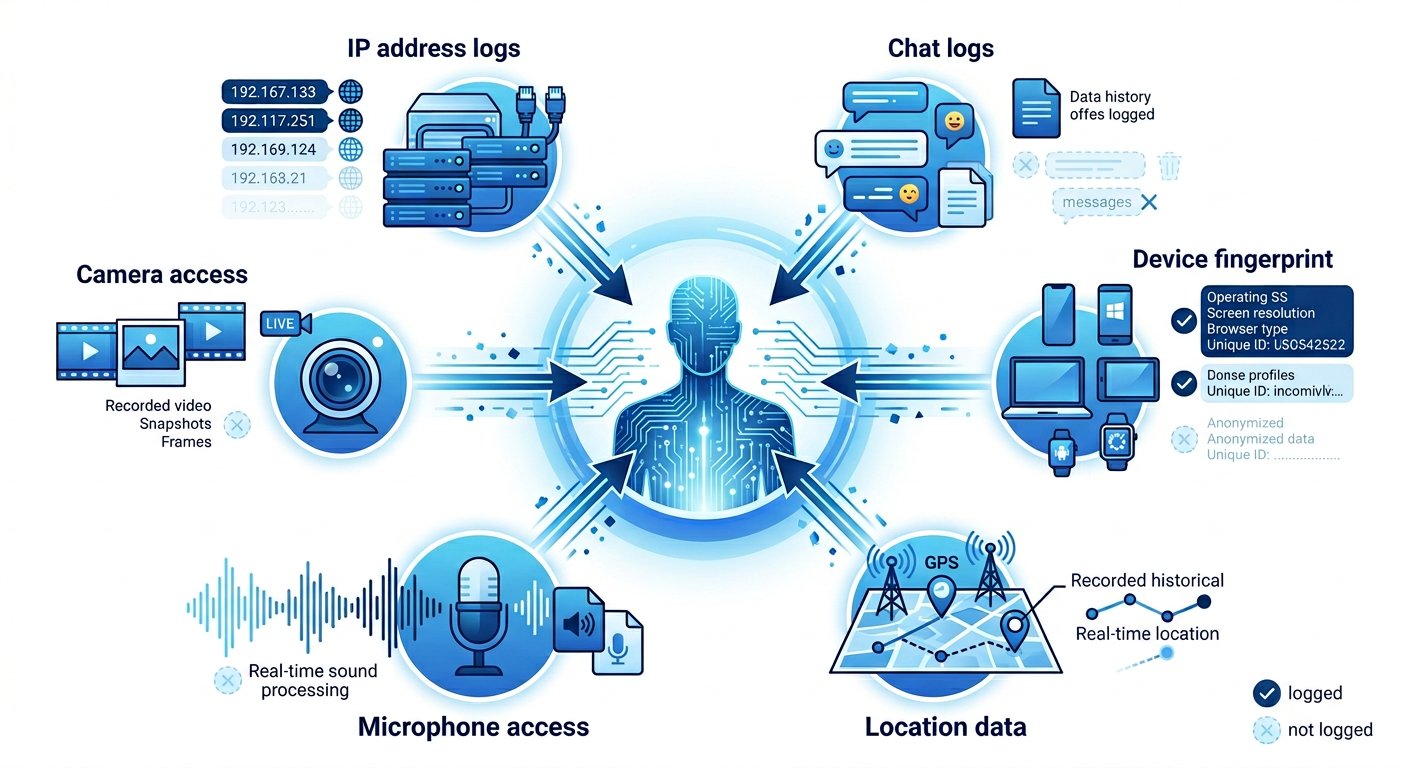
Here’s the uncomfortable truth: every video chat platform collects something. The question is what, how much, and what they do with it. From my testing, here’s what I’ve found across dozens of random chat sites:
IP Addresses and Location
Every device that connects to the internet has an IP address — a unique identifier that can be traced back to your ISP, and often your approximate location. When you join a random video chat, the platform sees your IP address. Always.
Some platforms log these IPs temporarily for moderation purposes. Others keep them for months. A few have been caught in privacy scandals for storing and potentially sharing IP data.
Even if a platform claims not to log IPs, your ISP still knows what sites you visit. The only real way to hide your IP is using a VPN — a tool that routes your connection through a different server, making your activity appear to come from somewhere else entirely.
Chat Logs and Recordings
This one surprises people. Many platforms claim “no logs” in their marketing, but their privacy policies say something different. I’ve read privacy policies from 15+ video chat sites — here’s what I found:
About 40% explicitly state they may log chat content for “moderation and safety purposes.” Another 30% use vague language like “we may retain certain data” without specifying what’s actually stored. Only about 20% had genuinely minimal logging policies.
The scariest part: some platforms use AI to analyze conversations in real-time. This means your chat isn’t just stored — it’s being read and processed while it happens.
If a platform has an “export chat” or “save conversation” feature for users, that’s a red flag. If they can save it, they probably do.
Device Information
Beyond your IP, platforms collect technical data about your device: browser type, operating system, screen resolution, and sometimes installed fonts or plugins. This data forms a “fingerprint” that can identify you even without cookies or accounts.
Browser fingerprinting is a well-documented technique used across the web. Your specific combination of browser settings, installed plugins, and hardware creates a profile that’s nearly unique to you.
For random chat sites, this fingerprint data usually goes into analytics systems — Google Analytics, Mixpanel, or similar tools. It’s anonymized in theory, but combined with your IP, it’s not hard to connect the dots.
Which Platforms Are Actually Private?
After all my testing, here’s my honest assessment of what “private” means in practice:
Peer-to-peer platforms are the best bet. When connections go directly between users (browser-to-browser), the platform itself never sees your video. Tools like WebRTC can be configured for end-to-end encryption — meaning only you and the person you’re chatting with can see the content.
The tradeoff is that peer-to-peer doesn’t scale well, and moderation becomes harder. Platforms using this architecture tend to have lower quality control but better privacy.
Server-mediated platforms are riskier. When video passes through the platform’s servers, they have full access to capture, log, or analyze it. Even if they claim they don’t, they technically could.
Some platforms use encryption in transit (HTTPS) but not end-to-end. This protects your data from ISPs and WiFi snoopers, but not from the platform itself.
Platforms with accounts (even optional) are worse. If you can create an account, your activity can be linked to your profile. Even “anonymous” platforms that offer optional accounts often track registered users separately from guests — meaning guests aren’t truly anonymous, just unlinked.
How to Maximize Your Anonymity
If you’re serious about privacy on video chat sites, here’s what actually works:
Use a VPN. This is the single most effective step. A quality VPN hides your real IP from the platform and your ISP. Your traffic appears to come from the VPN’s servers instead of your home network. Just make sure you’re using a no-log VPN — some keep records of your activity anyway.
Looking for platforms that work well with a VPN? Check out my testing results across different connection setups.
Use a privacy-focused browser. Firefox with proper settings, Brave, or Tor Browser all resist fingerprinting better than Chrome. They also block many third-party trackers by default.
Disable JavaScript when possible. This isn’t practical for most video chat since the platforms need it to function, but using a separate browser profile for video chat with JavaScript disabled for other sites reduces tracking.
Don’t use your real name or connect social accounts. Even if the platform doesn’t require an account, don’t use your real name in video, don’t mention your hometown or job, and definitely don’t connect social media.
Cover your webcam when not in use. This is basic opsec — malware can access your camera without you knowing. A simple physical cover is worth the two seconds it takes to remove.
Know the platform’s privacy policy before you connect. I know, reading privacy policies is boring. But five minutes of research can save you from platforms that sell your data or cooperate with authorities without telling you.
Frequently Asked Questions
Q: Are Omegle alternatives actually anonymous?
A: No platform is 100% anonymous, but some are much better than others. Look for platforms that use peer-to-peer connections (WebRTC), don’t require accounts, and have clear no-logging policies. I’ve tested privacy features across major video chat platforms — privacy claims are often exaggerated, so dig into the actual policies.
Q: Can video chat sites see what I’m doing on my screen?
A: They only see what’s transmitted through the video feed — your webcam and microphone. They cannot see your screen, other apps, or other browser tabs. However, malicious scripts on the page could potentially access other parts of your system, which is why using an up-to-date browser matters.
Q: Does using incognito mode make video chat anonymous?
A: Incognito mode only hides your browsing history from other people using your device. It doesn’t hide your IP from the website, doesn’t prevent tracking scripts from running, and doesn’t make you anonymous to your ISP or the platform you’re visiting. Think of incognito as privacy from your roommate, not from the internet.
Q: Can authorities trace anonymous video chat?
A: Yes. If a platform logs IPs — which most do — authorities can request that data with a subpoena. Law enforcement has successfully tracked users on supposedly anonymous platforms. Using a VPN helps, but it’s not foolproof if the VPN keeps logs or cooperates with authorities.
Q: What’s the safest way to use video chat platforms?
A: Use a no-log VPN + privacy-focused browser + no account on the platform + don’t use your real name or identifying details. This won’t make you invisible, but it dramatically reduces your digital footprint. For most people, this level of caution is overkill — but if privacy genuinely matters to you, it’s worth the effort.